
Compare Two Requests: Line-by-Line HTTP Diff
“Why did it succeed this time and fail last time?” “For the same endpoint, exactly which line differs between the successful request and the failed one?” Line up two requests / responses side by side and the answer surfaces immediately. This is the fastest way to investigate intermittent production issues, reproduce differences, and verify changes.
1. How to use it: done in two steps
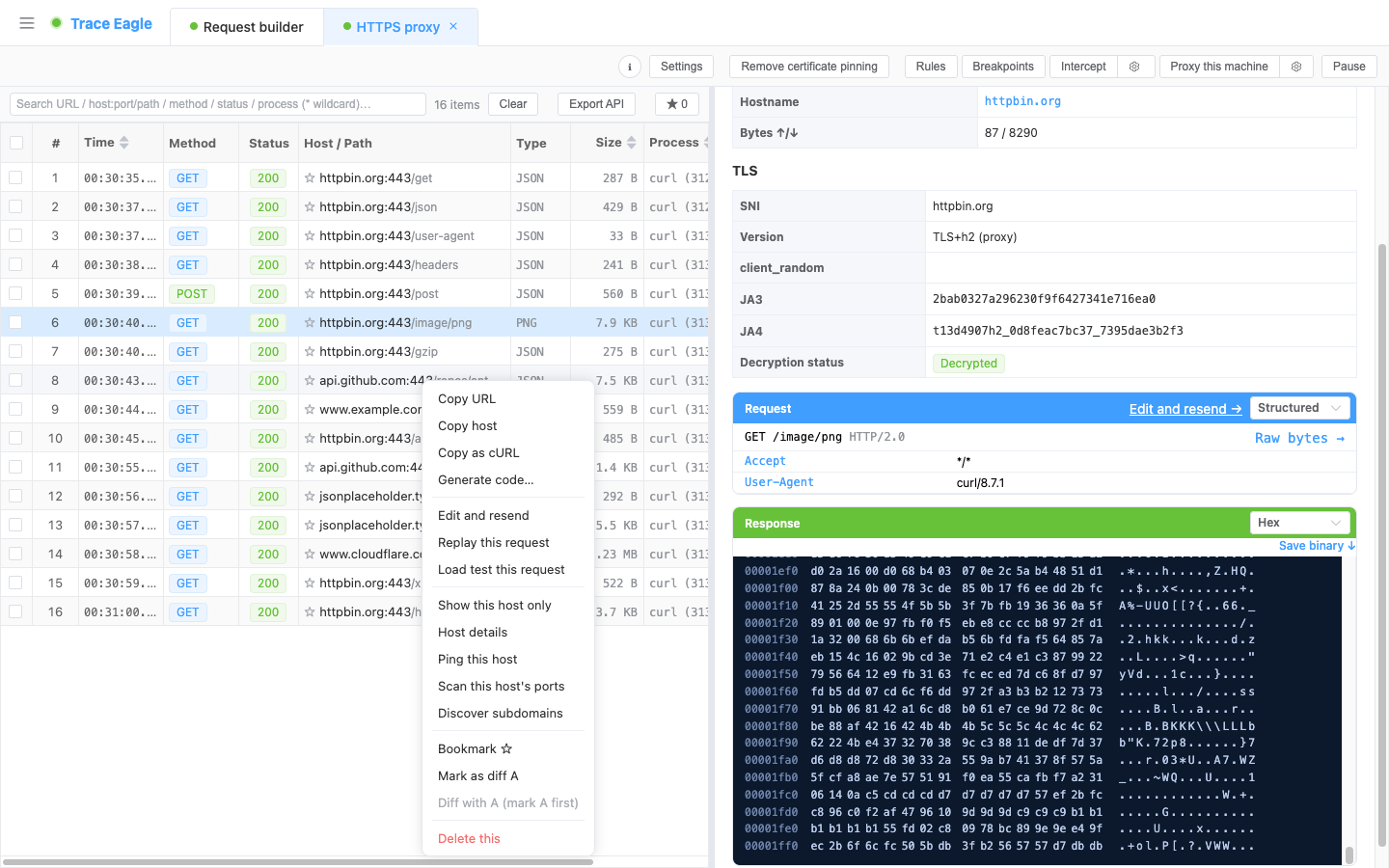
Section titled “1. How to use it: done in two steps”- Right-click any piece of traffic and choose “Mark as compare A”.
- Right-click another piece of traffic and choose “Compare with A”.
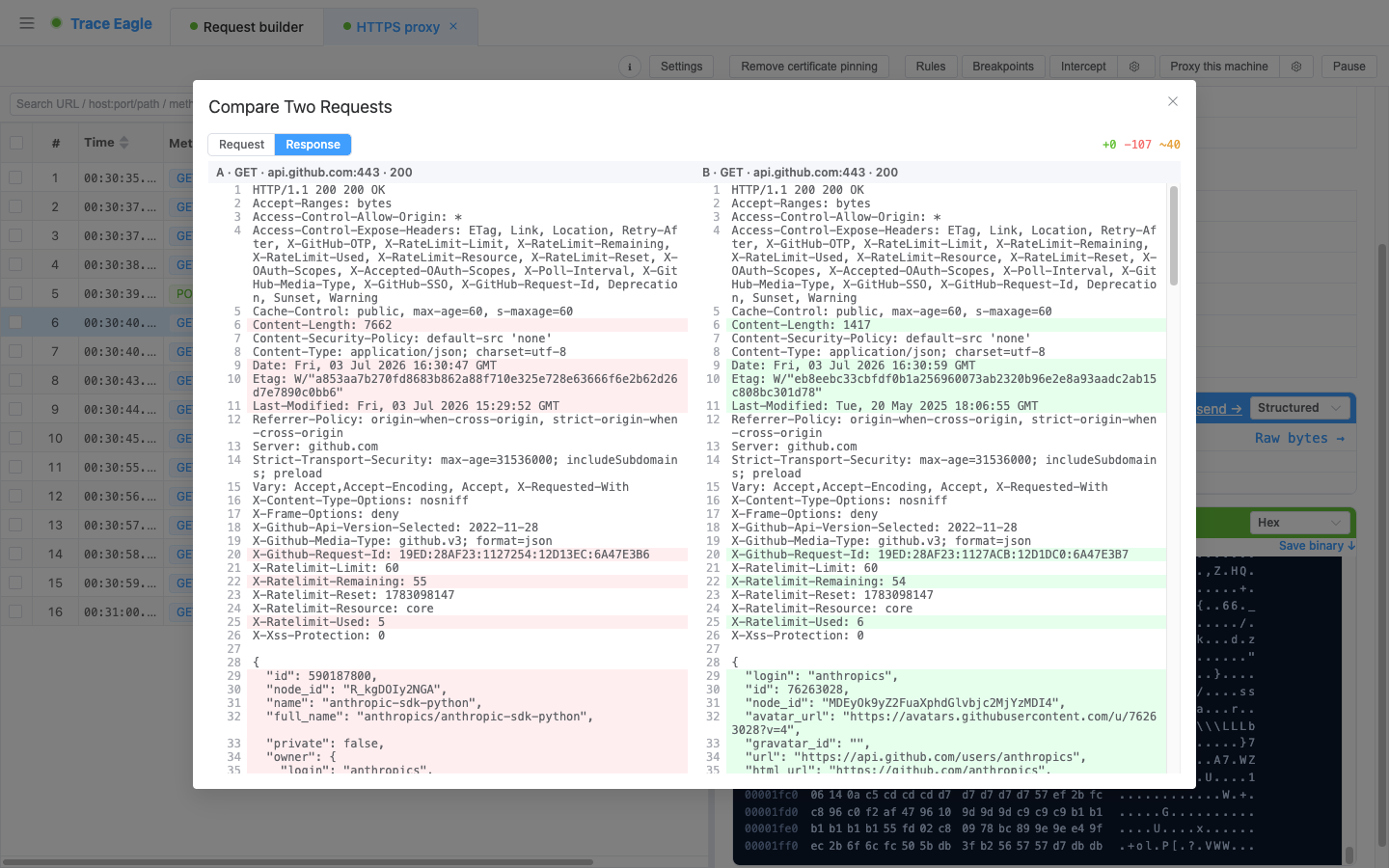
A side-by-side comparison window pops up immediately, marking every difference between the two line by line.
2. What to look at: both requests and responses can be compared
Section titled “2. What to look at: both requests and responses can be compared”At the top of the window you can switch with one tap between comparing the request or the response. The two sides are A and B, each with a label (method · host · status), so you can see at a glance which two you are comparing. The comparison covers the entire message:
- Start line: the request line (method / address / protocol) or response line (protocol / status code)
- All request headers / response headers
- Request body / response body (automatically beautified, then compared line by line, with JSON, XML, and forms all easy to read)
3. Differences at a glance
Section titled “3. Differences at a glance”- Beautify first, then diff line by line: JSON, XML, and forms are formatted first and then compared line by line, so the fields that truly changed stand out at a glance, without being buried under format noise like line breaks and indentation.
- Line-by-line color coding: additions (+), deletions (−), and changes (~) are each highlighted, with the A side marked red and the B side marked green, and changed lines shown side by side.
- Difference count: the top gives a summary of the “added / deleted / changed” line counts, so you know the scale.
- It tells you when they are identical: when the two match, it clearly indicates “identical,” so you do not have to confirm line by line yourself; when one side has no content or is not yet decrypted, it says so directly rather than leaving you waiting.
- With line numbers: each side has its own line numbers to locate the exact position.
4. Where it really shines: comparing across sessions and across sources
Section titled “4. Where it really shines: comparing across sessions and across sources”The two records being compared need not come from the same capture session, nor need they be captured at the same time; as long as you have seen them in the interface, you can bring them in to compare:
- Success vs. failure: line up a successful request and a failed one and immediately see which header, which parameter, or which part of the body differs.
- Hand-built vs. real: compare a request replayed / sent and then captured in the Request Composer against a real request captured earlier, to verify “whether I built it correctly” and “whether the signature is computed consistently.”
- Before and after a change: after changing the server / client, compare the old and new requests to confirm whether the change took effect and whether there are side effects.
- Across environments: view the returns of the same endpoint in the test environment and the production environment side by side to quickly locate configuration or data differences.
This is also where it is far more powerful than inspecting a single request: differences are exposed through comparison rather than relying on memory and the naked eye. Ordinary tools can often only compare within the same session, by eye, piece by piece.
5. Typical scenarios
Section titled “5. Typical scenarios”- Investigating intermittent failures: successful request vs. failed request, to pin down the differing field.
- Integration alignment: the request the client actually sent vs. the API documentation / expected request.
- Regression verification: confirming the difference in the same request / response before and after a change.
- Signature debugging: a hand-built signed request vs. a real request, verifying whether every part is consistent.
Back to Proxy Capture · Related: Request Composing and Replay