
Rewrite Rules and Breakpoints for HTTP Traffic
Capturing lets you “look”, rules and breakpoints let you “change”. Trace Eagle makes you the owner of your traffic: change requests without writing code, using simple, direct point-and-click rules to automatically rewrite thousands of flows; or use breakpoints to pause and edit flows one at a time; only for the complex logic that rules genuinely cannot express do you need to fall back on scripts / plugins.
1. Rewrite Rules (simple point-and-click, automatic changes)
Section titled “1. Rewrite Rules (simple point-and-click, automatic changes)”The worst way to start changing requests is by writing a script. Here you don’t have to: pick an action from a cheat sheet and fill in a value, and that’s a rule: simple, intuitive, and applied the moment you make it.
Rules are one per line, of the form <match> <action>://<value> (for example *.example.com resHeaders://X-Debug: 1). Blank lines and # comments are ignored, each line is validated on its own, and changes are hot-applied on save; rules can be organized into named groups and toggled group by group. The interface comes with a clickable cheat sheet: click once to insert the matching example, then just edit the value, no syntax to memorize.
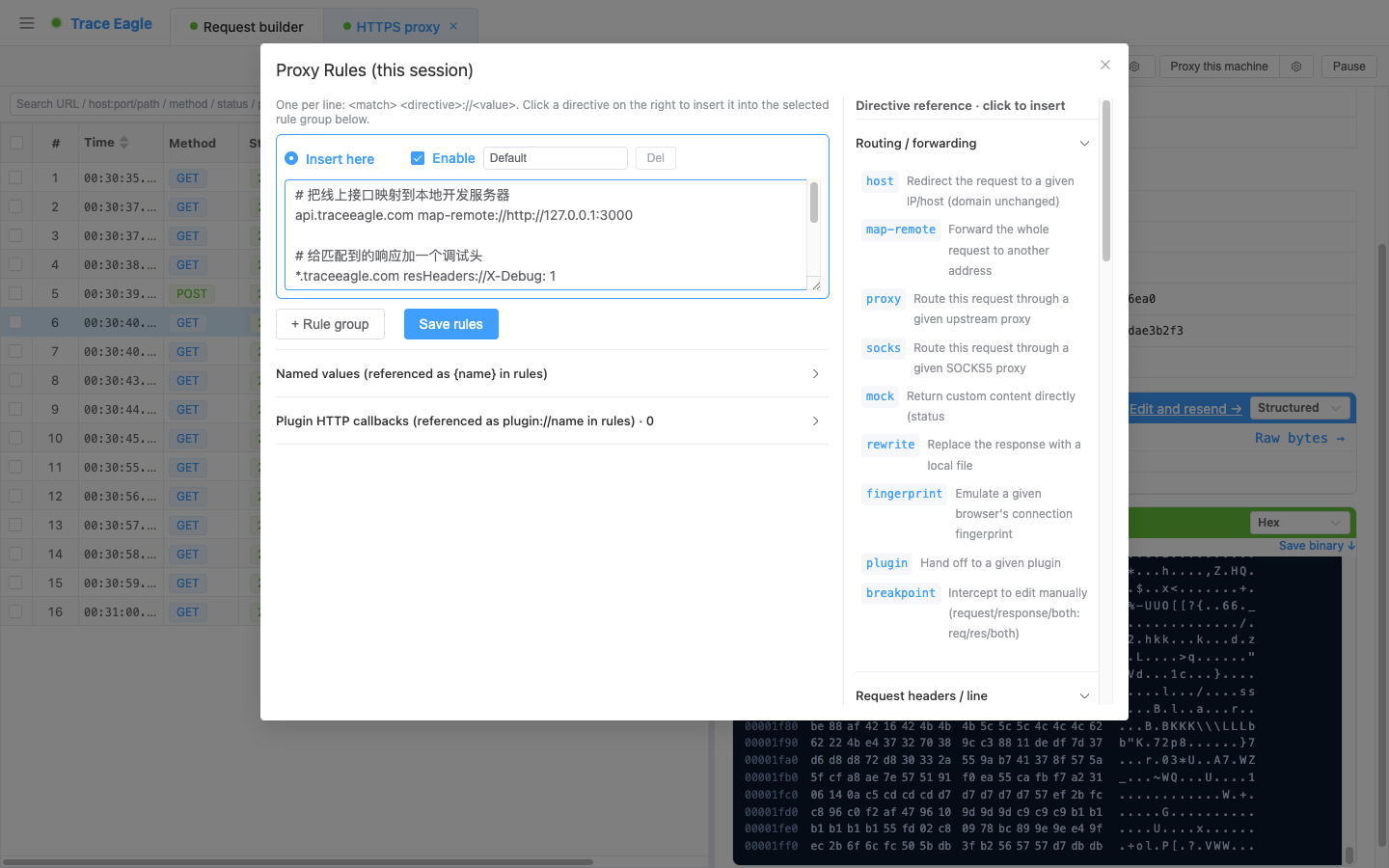
Flexible matching conditions
Section titled “Flexible matching conditions”- Exact domain:
traceeagle.com(can include a path prefixtraceeagle.com/path) - Wildcard subdomain:
*.traceeagle.com(matches the apex domain plus all subdomains) - Regex against the whole URL:
regex://… - Exact full URL:
$https://host/path - Port:
:8080 - Negation: prefix any match with
!
Supported rewrite actions
Section titled “Supported rewrite actions”Request direction
- Redirect / forward: change the dialed target IP (
host), map to a different full URL (map-remote, can point to a local dev server), route through an upstream http/socks5 proxy, or restore a client’s network request characteristics to those of a standard client (faithful reproduction). - Mock fake data:
mock://200ormock://200|<body>, return a preset response without hitting the server, a lifesaver when the frontend is waiting on a backend API. - Edit request line / headers: method, User-Agent, Referer, Basic auth, X-Forwarded-For, Content-Type / charset, Cookie, merge query parameters, URL find-and-replace.
- Edit request body: full replace / find-and-replace / append / prepend / dump to a local file.
Response direction
- Edit status / headers: change the status code, add or remove any response header, Set-Cookie, open up CORS with one click, force an attachment download, cache control (disable caching or set max-age), disable Cookie/compression/keep-alive, header-value find-and-replace.
- Edit response body: full replace / find-and-replace / append / prepend / shallow JSON merge.
- Inject by type: only when the Content-Type matches, inject or replace scripts, styles, or snippets into HTML / JS / CSS.
Network and protocol
- Dump to file: besides the request / response body, the entire raw request / response can also be dumped to a local file with one click, for archiving or offline analysis.
- Poor-network simulation: request / response delay (milliseconds), bandwidth throttling (with 2G / 3G / 4G presets).
- WebSocket frame rewrite:
old=>newreplacement by direction (both ways / client to server / server to client). - Raw TCP / UDP rewrite: replacement by direction on non-HTTP byte streams / SOCKS5 UDP datagrams.
Dynamic values in rules
Section titled “Dynamic values in rules”Rule values can use dynamic variables such as ${url} ${host} ${port} ${method} ${status} ${now} ${random} ${randomUUID} ${req.headers.X} ${res.headers.X}, plus custom named values {name} (define a common value once, reference it everywhere). Named values {name} are used mainly in request / response rewrites; WebSocket frame rewrite replacement values support ${...}.
2. Breakpoints (manual editing)
Section titled “2. Breakpoints (manual editing)”For flows that need precise, case-by-case control, use a breakpoint to pause and pop up an editor before the request is sent or before the response returns.
Two ways to trigger
Section titled “Two ways to trigger”- Rule-triggered: use a
breakpoint://req|res|bothrule to precisely mark which flows to intercept. - Global interception switch: turn on interception for the whole session, then optionally narrow the scope with interception filter rules (filter by domain / method / stage); with no rules, everything is intercepted.
What you can change once intercepted
Section titled “What you can change once intercepted”- Request stage: method, URL (the host follows the URL), headers, body.
- Response stage: status code, response headers, response body.
- Discard directly: Abort drops this request / response (the client receives a gateway error).
- Flows matching multiple hits queue up for you to handle: you can resume each one (Resume), discard it (Abort), or resume all at once. Flows left unhandled for a long time are automatically resumed unchanged, so traffic is never stuck indefinitely.
3. Scripts and Plugins (advanced automation)
Section titled “3. Scripts and Plugins (advanced automation)”For logic that rules cannot express, hand it off to a script or plugin:
- JavaScript scripts: define
onRequest(req)/onResponse(resp)and edit fields directly to take effect. Built-in helpers include logging, synchronous outbound calls to other services, stashing data across requests (for counters / cached tokens), Base64 encode/decode, and more. - HTTP outbound plugins: use a
plugin://namerule to hand the request / response to your own plugin service for processing (called over HTTP), and the plugin returns the rewritten content (or mocks it directly). Language-agnostic, suitable for teams to implement custom processing in any language.
4. Processing Order
Section titled “4. Processing Order”A flow passes through, in order: request rules, request scripts, request plugins, request breakpoint, forward / mock, response rules, response scripts, response plugins, response breakpoint. The pattern is simple: automatic rules first, then scripts, then plugins, and only last does a breakpoint step in manually, each doing its own job without stepping on the others.
Back to Proxy Capture · Related: Compose and Replay