
Decode Private Binary Protocols with JavaScript
Captured a private or in-house socket protocol that the built-in formats can’t recognize, leaving you with nothing but a pile of bytes? Custom decoding lets you teach the tool how to read it with a short script: slice a continuous byte stream into individual messages, strip off the protocol header, decompress when needed, and leave the rest to the tool’s automatic structured recognition.
This page is for anyone who wants to write a decoder themselves. It explains how to write the function, when it gets called, and what the return value means.
1. What it is: a per-frame decoding hook
Section titled “1. What it is: a per-frame decoding hook”You write a decoding hook, and the tool feeds it a connection’s bytes, repeatedly asking one question: “Starting here, can you slice out one complete message?” You slice out a message and report how many bytes you used; it asks again with the remainder, and so on until the stream is fully sliced.
If you’ve ever written an accumulating byte decoder in a networking framework, the mental model is the same: given a continuous byte stream, you decide the message boundaries yourself. Two key conventions:
- You don’t worry about direction: a connection’s send stream and receive stream each run through your hook separately, and the tool automatically labels each sliced message with its direction. Your script only handles “how to slice.”
- Once sliced, you don’t handle rendering: every message you push out runs through automatic recognition again. If it holds protobuf, JSON, or plist inside, that gets parsed further into structured form. You are only responsible for framing, stripping headers, and decompressing.
2. The decode function: decode(buf, out)
Section titled “2. The decode function: decode(buf, out)”The whole decoder is a single function:
function decode(buf, out) { // buf: the byte stream currently pending parse; out: the output collector; return: the number of bytes consumed this time}What the inputs, outputs, and return value are
Section titled “What the inputs, outputs, and return value are”buf (input): the byte stream pending parse
- Type:
ArrayBuffer. Its contents are all the remaining bytes “from where you last finished consuming, up to the current end.” - Property
buf.byteLength: how many bytes remain right now (it may grow with each call; this is how you judge whether there is enough to slice a message). - ⚠️ It is a raw byte buffer, not a
Uint8Array, so you can’t index bytes directly (buf[0]returnsundefined). To read bytes, use the built-in helpers in section 3 (u8/u16be/sub…), or wrap a view yourself:new Uint8Array(buf),new DataView(buf).
out (output): the output collector
- Type: a plain array.
- Method
out.push(message bytes): push out one message; you can push several in a single call. - “Message bytes” can be: an
ArrayBufferreturned by a built-in helper (such assub(...),gunzip(...)), or a string. Other types are ignored.
Return value: how many bytes you consumed
- Type: integer (
number), the number of bytes you used from the start ofbuf. > 0: you ate this many bytes off the front and sliced a message → the tool discards them and calls you again with the remainder.0/ noreturn/ negative number: means “there isn’t a complete message at the front yet” or “nothing more can be sliced” → the tool stops the loop and displays the remaining bytes as raw.- The return value is automatically clamped within the buffer length (to prevent overruns), but please return the true number of bytes you actually used.
When it gets called (lifecycle)
Section titled “When it gets called (lifecycle)”- The tool runs one pass over a connection’s send stream and one over its receive stream. In each pass,
decodeis called in a loop: each time, it hands you the remaining unconsumed bytes, you slice one message and return the number consumed, and so on until you return 0. - A message only appears once its consumption is confirmed: the message you push shows up only when you also return > 0. If you push but return 0, the loop stops and the push is discarded, so pushing a message must always be paired with returning how many bytes it took.
- After the loop ends, unconsumed trailing bytes are not lost; they are shown as a single piece of raw data (for example, the second half of an incomplete message).
State and idempotence
Section titled “State and idempotence”- Each stream (direction) gets a separate, brand-new script environment; the send stream and receive stream never bleed into each other.
- To keep state across calls (a counter, the previous message’s type, and so on), declare the variables outside
decode. They persist across calls within the same stream, and reset when the direction changes or you re-decode. - Decoding runs on data already captured, and can be re-run repeatedly: edit the script, save, and click again to re-decode the same connection with the new rules.
Errors won’t break anything
Section titled “Errors won’t break anything”- If the script throws an exception or a single run times out, it’s treated as “consumed nothing this time,” the remaining bytes are shown as raw data, and capture keeps running with no data lost.
- In other words, the worst a broken script can do is fail to decode, leaving you with raw bytes; it won’t crash the connection. Edit freely.
- And errors aren’t swallowed: exceptions and timeouts are shown in the debug output panel above the results (see section 5), labeled with whether they came from the send
↑or receive↓stream. Follow them straight to the fix.
3. Built-in helpers (directly available in the script)
Section titled “3. Built-in helpers (directly available in the script)”The common tasks, reading bytes, reading integers, converting to text, and decompressing, are all built in, so you don’t have to reinvent them:
| Category | Signature | Description |
|---|---|---|
| Take sub-slice | sub(buf, off[, len]) |
Slice from off (omit len to go to the end), returns ArrayBuffer |
| Read integer | u8(buf, off) / u16be / u16le / u32be / u32le (buf, off) |
Read unsigned integers in big-endian / little-endian |
| Convert to text | hex(buf) / ascii(buf) |
Convert to a hex string / read as text |
| Detect compression | gzipMagic(buf) |
Whether it’s gzip (returns a boolean) |
| Decompress | gunzip / inflate / unzstd / lz4dtx (buf) |
Decompress; if it can’t, returns the input unchanged without erroring |
| Debug | log(...args) / console.log(...args) |
Print to the debug panel (see section 5) |
The standard byte read/write capabilities (DataView, Uint8Array, etc.) are also directly usable.
4. Examples
Section titled “4. Examples”① Length prefix [4-byte big-endian length][payload], the most common private protocol shape:
function decode(buf, out) { if (buf.byteLength < 4) return 0 // the length header hasn't fully arrived, wait const total = 4 + u32be(buf, 0) // whole message = 4-byte header + payload if (buf.byteLength < total) return 0 // the whole message hasn't fully arrived, wait out.push(sub(buf, 4, total - 4)) // strip the header, hand the payload to auto recognition return total // consume this message, go on to slice the next}② By delimiter / by line, slicing frames on a marker such as a newline:
function decode(buf, out) { const i = ascii(buf).indexOf('\n') if (i < 0) return 0 // no newline yet, wait out.push(sub(buf, 0, i)) // push this line (without the newline) return i + 1 // consume the newline along with it}③ Process the whole thing at once, treating the whole stream as one message, for example decompressing the whole thing:
function decode(buf, out) { out.push(gzipMagic(buf) ? gunzip(buf) : buf) // if it's gzip, unpack it return buf.byteLength // consume everything, the loop ends right away}④ Dispatch by type, with a type field in the header and different handling per type:
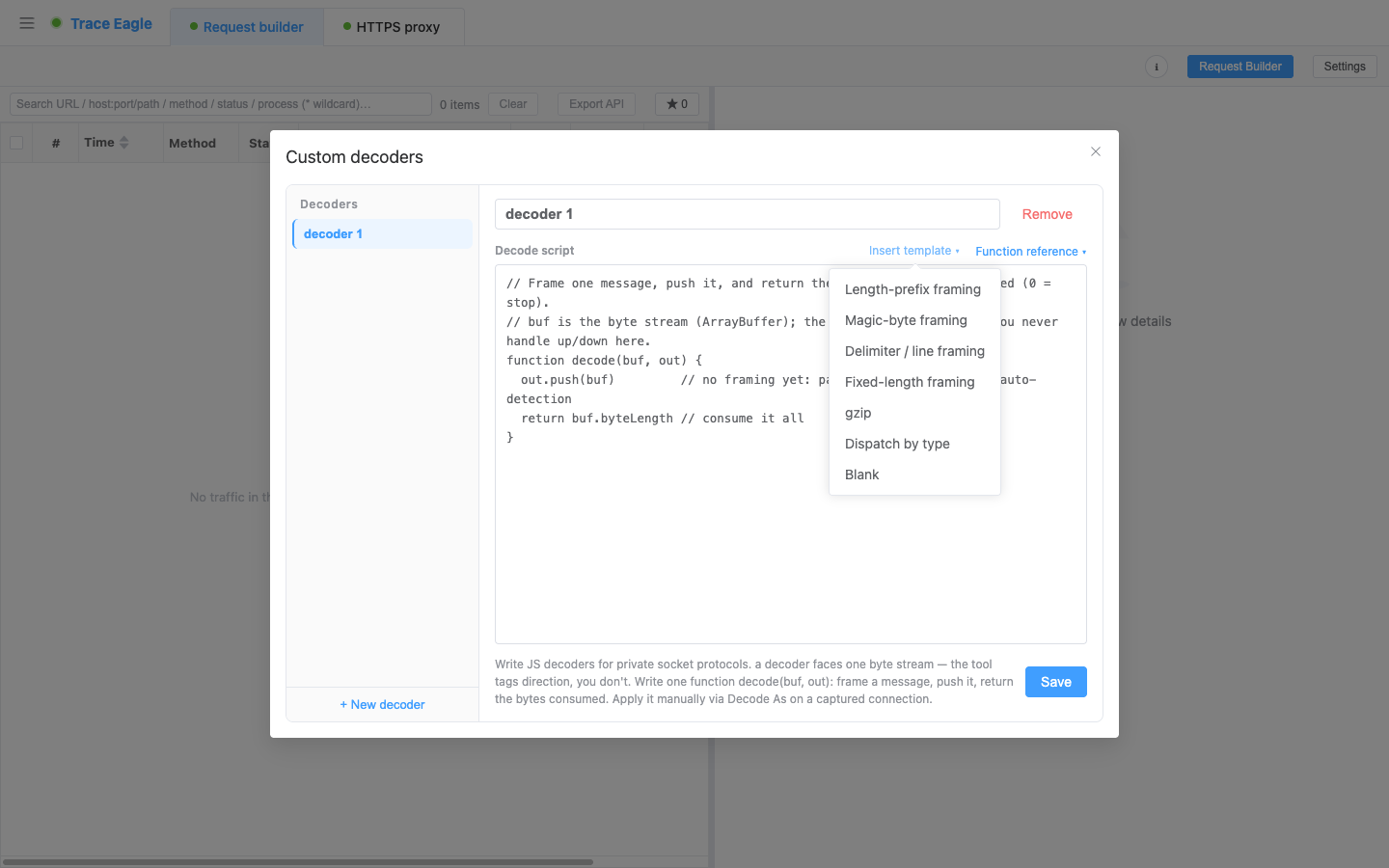
function decode(buf, out) { if (buf.byteLength < 4) return 0 const total = 4 + u32be(buf, 0) if (buf.byteLength < total) return 0 const type = u8(buf, 4) // the first byte is the message type const body = sub(buf, 5, total - 5) out.push(type === 2 ? gunzip(body) : body) // type 2 is compressed return total}The editor has ready-made templates for all these patterns; insert one, tweak a few numbers, and it runs.
5. How to use it, how to debug it
Section titled “5. How to use it, how to debug it”- Write and save: create, name, and save in the decoder editor; insert a template to get started, with the built-in functions in a quick reference close at hand.
- Apply: for a connection you can’t make sense of, right-click and choose “Decode as” → your decoder, and the whole connection’s send and receive traffic is immediately sliced up and shown by your rules.
- Debug and inspect variables: inside
decode, uselog(...)orconsole.log(...)to print any value: byte counts, type fields,hex(sub(buf, 0, 8)), and so on. The output appears in the “Debug output” panel above the “Decode as” results, each line labeled with whether it came from the send↑or receive↓stream. Script errors and timeouts show up in the same panel, also labeled with direction. Print and locate this way; it’s far faster than editing blindly.The sandbox has no full browser / Node
console; onlyconsole.logand the equivalentlogare wired to this panel.TextDecoder,fetch,setTimeout, and the like are not available. To read bytes as text, useascii(buf). - Edit and see it live: no need to re-capture. Save your script, click “Decode as” again, and the same connection is re-decoded on the spot with the new rules. Iterate until it slices the way you want.
- On to the structure: each decoded piece is handed back to automatic recognition, so protobuf, JSON, and plist are parsed further into structured form, viewable through the multiple views in Inspecting and decoding data.
- Decoders can be named and kept as a list, to be added, edited, or deleted at any time.
6. When to use it
Section titled “6. When to use it”- When you capture an in-house or private socket protocol (a common shape is length prefix + protobuf / JSON / binary) that the built-in formats can’t recognize, write a decoder to slice it up and restore it to a readable structure.
- When you want to turn a chunk of bytes wrapped in a custom header, or run through a round of compression, back into readable content.
7. API reference
Section titled “7. API reference”A consolidated quick reference: the decode entry point, the built-in helper functions, and the runtime environment. Every function that takes buf accepts either an ArrayBuffer or a string.
Decode entry point
Section titled “Decode entry point”decode(buf, out) → number| Purpose | The decoder’s sole entry point, must be implemented. Slice messages from the front of buf, push them to out, and return the number of bytes consumed this time. |
buf |
ArrayBuffer, the remaining byte stream pending parse. Use buf.byteLength for its length; you can’t index bytes, use the helpers below or new DataView(buf) / new Uint8Array(buf). |
out |
Array, the output collector. out.push(bytes) pushes out one message (bytes is an ArrayBuffer or a string; other types are ignored); you can push several at once. |
| Return | number, the bytes consumed from the front of buf. > 0 continues; 0 / negative / no return → stop, and remaining bytes are shown as raw. |
| Call convention | Run one pass each over the connection’s send stream and receive stream; each pass calls repeatedly, passing in the remaining unconsumed bytes each time, until you return 0. |
Built-in helper functions
Section titled “Built-in helper functions”Take sub-slice
| Signature | Returns | Description |
|---|---|---|
sub(buf, off) |
ArrayBuffer |
Slice from off to the end |
sub(buf, off, len) |
ArrayBuffer |
Slice len bytes from off; an out-of-range off / len is automatically clamped, no error |
Read integer (unsigned; returns 0 when off is out of range)
| Signature | Returns | Description |
|---|---|---|
u8(buf, off) |
number |
Read 1 byte |
u16be(buf, off) / u16le(buf, off) |
number |
Read 2 bytes, big-endian / little-endian |
u32be(buf, off) / u32le(buf, off) |
number |
Read 4 bytes, big-endian / little-endian |
Convert to text
| Signature | Returns | Description |
|---|---|---|
hex(buf) |
string |
Convert to lowercase hexadecimal |
ascii(buf) |
string |
Read out as text (suitable for ASCII / text content) |
Compression / decompression (returns the input unchanged when it can’t decompress; single-decompression cap around 16 MB)
| Signature | Returns | Description |
|---|---|---|
gzipMagic(buf) |
boolean |
Whether it starts with the gzip magic number |
gunzip(buf) |
ArrayBuffer |
gzip decompression |
inflate(buf) |
ArrayBuffer |
zlib / deflate decompression |
unzstd(buf) |
ArrayBuffer |
zstd decompression |
lz4dtx(buf) |
ArrayBuffer |
Block LZ4 stream decompression |
Debug
| Signature | Returns | Description |
|---|---|---|
log(...args) |
(none) | Join the arguments into one line and print to the “Debug output” panel; an ArrayBuffer is shown in hexadecimal |
console.log(...args) |
(none) | Same as log (convenient for those used to console.log) |
Runtime environment
Section titled “Runtime environment”- Standard JavaScript: common built-in objects such as
ArrayBuffer, typed arrays (Uint8Array, etc.),DataView,JSON,Math,RegExp,Dateare all available; when you need lower-level byte read/write,new DataView(buf)/new Uint8Array(buf)are at hand. - Debug:
log(...)/console.log(...)print to the “Debug output” panel; script errors and timeouts are printed there too, labeled with whether they came from the send↑or receive↓stream. - Not provided are the other browser / Node-specific capabilities:
consolemethods other thanlog,TextDecoder/TextEncoder,fetch,setTimeout,require, etc. are all unavailable. To read bytes as text, useascii(buf). - Each
decodecall has an execution time cap: an infinite loop or a timeout is interrupted and treated as “consumed nothing,” so it won’t hang the tool.
Back to Proxy capture · Related: Inspecting and decoding data · Local NIC capture