
Compose and Replay HTTP Requests with Signatures
Capturing is not only about “looking”. Trace Eagle’s request composer (Composer) puts “the real captured request” and “manual construction and debugging” in one place: any captured request can be resent as-is, or resent after tweaking parameters; you can also build a request from scratch and send it. No more switching back and forth between a capture tool and a separate API-debugging tool.
1. Two entry points
Section titled “1. Two entry points”- Resend / edit and replay: right-click in the traffic list, or click “Edit and resend” in the detail panel, to load this captured request into the composer as-is. The address is restored from the protocol / host / port at capture time, irrelevant connection headers are stripped, and the body and its type are detected from the content, all automatically. Tweak a few parameters and resend.
- Build from scratch: assemble a new request by hand right in the composer.
Both entry points use the same send channel, and results are recorded in a separate Composer session tab (keeping the full history), where, like a captured request, they can be viewed, edited again, and compared.
2. Build a request by hand
Section titled “2. Build a request by hand”- Request line: method (GET / POST / PUT / DELETE / PATCH / HEAD / OPTIONS) + URL.
- Parameter table: query parameters are managed row by row in a table, kept separate from the URL and assembled only at send time, which means the dynamic placeholders inside are not broken by premature encoding.
- Header table: add, remove, or edit any header row by row.
- Auth helper: None / Bearer Token / Basic (username + password, base64 automatically); only takes effect when you have not written an Authorization header yourself.
- Body: none / JSON / form (form-urlencoded) / raw text; choosing JSON or form automatically adds the matching Content-Type.
3. Dynamic values: handle signed / encrypted private APIs
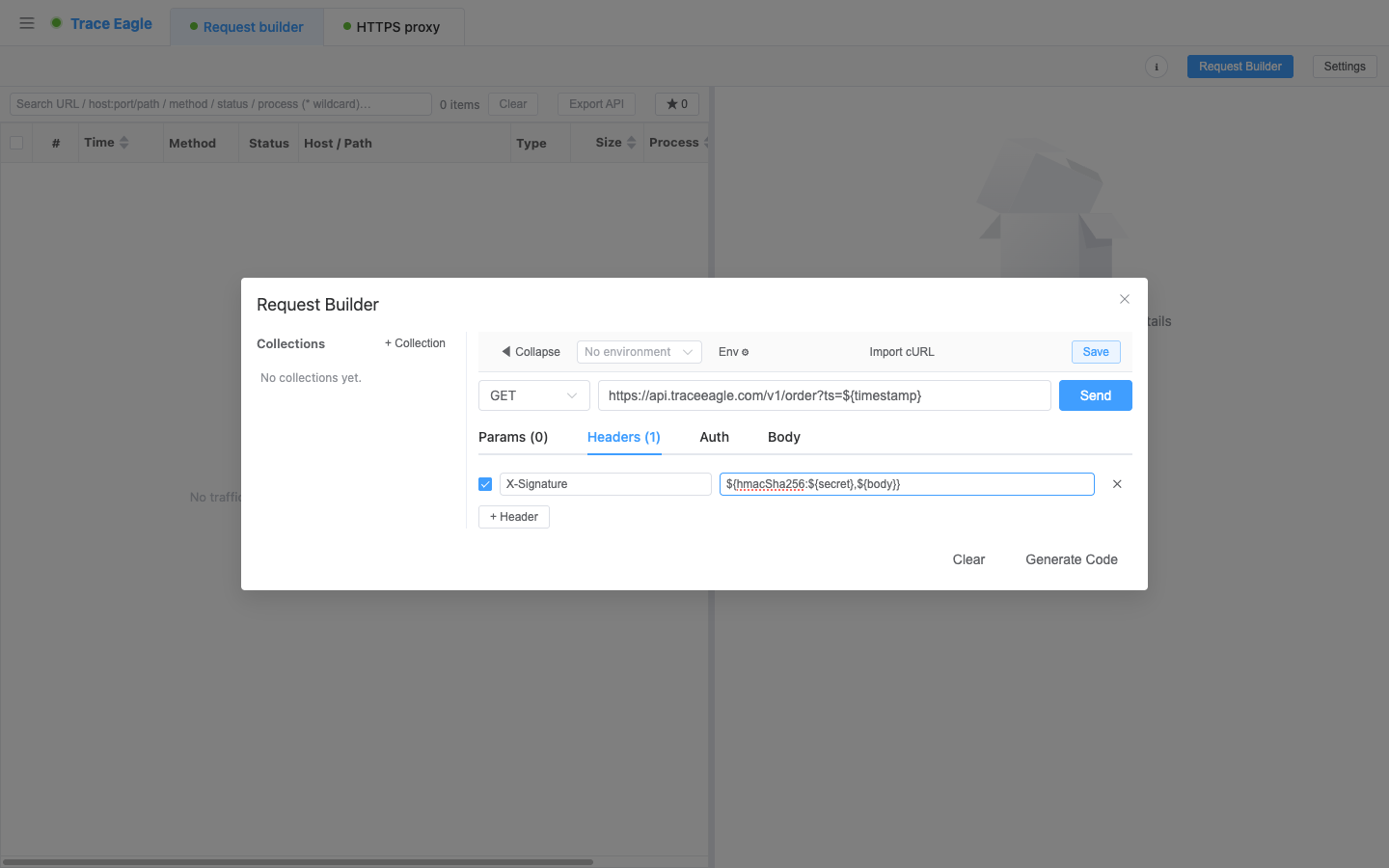
Section titled “3. Dynamic values: handle signed / encrypted private APIs”Any field can contain ${...} dynamic values, evaluated by the engine before sending. This is a lifesaver for debugging private APIs that carry a signature / timestamp / nonce:
| Dynamic value | Purpose |
|---|---|
${uuid} / ${randomUUID} |
Random UUID |
${timestamp} |
Unix timestamp in seconds |
${timestampMs} / ${now} |
Unix timestamp in milliseconds |
${random} |
16-digit random hex |
${randomInt:min,max} |
Random integer in a range |
${base64:} / ${base64url:} / ${base64decode:} |
Base64 encode / decode |
${md5:} / ${sha1:} / ${sha256:} |
Hash |
${hmacSha256:key,msg} / ${hmacSha256Base64:key,msg} / ${hmacSha1:key,msg} |
HMAC signature |
${urlEncode:} / ${upper:} / ${lower:} |
URL encode / case conversion |
- Nesting supported: for example
${hmacSha256:${secret},${body}}, resolve the variable first, then compute the signature. - Anything that cannot be resolved is kept as-is, so you can spot at a glance which variable was not evaluated, whereas ordinary tools often error out or send an empty value when they hit an undefined variable.
4. Environments and collections
Section titled “4. Environments and collections”- Environment variables: extract
${name}into environment variables, and switch between multiple environments (such as “dev / test / prod”) with one click; variables can reference each other and expand in a chain. - Collections: group frequently used requests under named folders, save the current request at any time, and load it back for reuse whenever you like.
- Automatic workspace saving: collections + environments are automatically saved as a plain-text, version-controllable file that can be diffed and reviewed, making it easy to share within a team and trace history.
5. Import and code generation
Section titled “5. Import and code generation”- cURL import: paste a cURL command to parse it into an editable request (supports common parameters such as
-X / -H / -d / --data-* / -u / -b / -A / -e, including quote handling, and automatically treats it as POST when there is a body). - Collection file import: import external API collection files (raw body is the focus; groups are flattened into a single collection).
- Code generation: export the current request to a cURL / Python / JavaScript(fetch) / Go / OkHttp code snippet with one click, handy for writing scripts, dropping into a project, or sharing with a colleague.
6. Faithful sending: keep reproduction close to the real path
Section titled “6. Faithful sending: keep reproduction close to the real path”The value of replay lies in “the reproduced request matching the real environment”. In the composer’s settings, sending can keep the same network characteristics as the capture session, making the results more trustworthy:
- Upstream proxy: send through an upstream proxy (http / socks5), routing the replayed request to a company proxy, jump host, or other secondary proxy.
- Request characteristics fidelity (browser profile): restore the replayed request’s network characteristics to those of a standard client (such as a common browser), keeping the reproduced request consistent with the real path.
- Custom DNS: specify which DNS resolves the domain, to avoid poisoning or take a designated route.
Before sending, all ${...} dynamic values are evaluated locally first, so you can always see exactly what will actually be sent. Each send goes through a separate Composer session, isolated from the capture session; results show the status code, protocol, and elapsed time inline, and are recorded as a Flow in the session, so, like a captured request, they can be viewed again, edited again, and compared.
7. Pair with request comparison (Diff)
Section titled “7. Pair with request comparison (Diff)”A composed / replayed request can be compared line by line, side by side with a real captured request from history, quickly pinpointing “what exactly differs between this time and last time for the same endpoint”, which is especially efficient for troubleshooting signature, parameter, and response differences. See Request Comparison.
Back to Proxy Capture · Related: Rewrite Rules and Breakpoints · Request Comparison