
Install the Root Certificate on PC, iOS, Android
To capture HTTPS with a proxy, the first step is to have devices and software trust this tool’s root certificate, otherwise you get TLS errors and cannot decrypt. Certificate management makes this one-click and comprehensive: this machine, phones, and even those programs that “still don’t trust it after the system certificate is installed” can all be set up.
1. One-click install on this machine
Section titled “1. One-click install on this machine”- Check at any time whether this machine already trusts this tool’s root certificate.
- “Install and trust on this machine” with one click, once and done, after which every session can decrypt HTTPS.
- When needed, download the root certificate (multiple formats) to distribute manually.
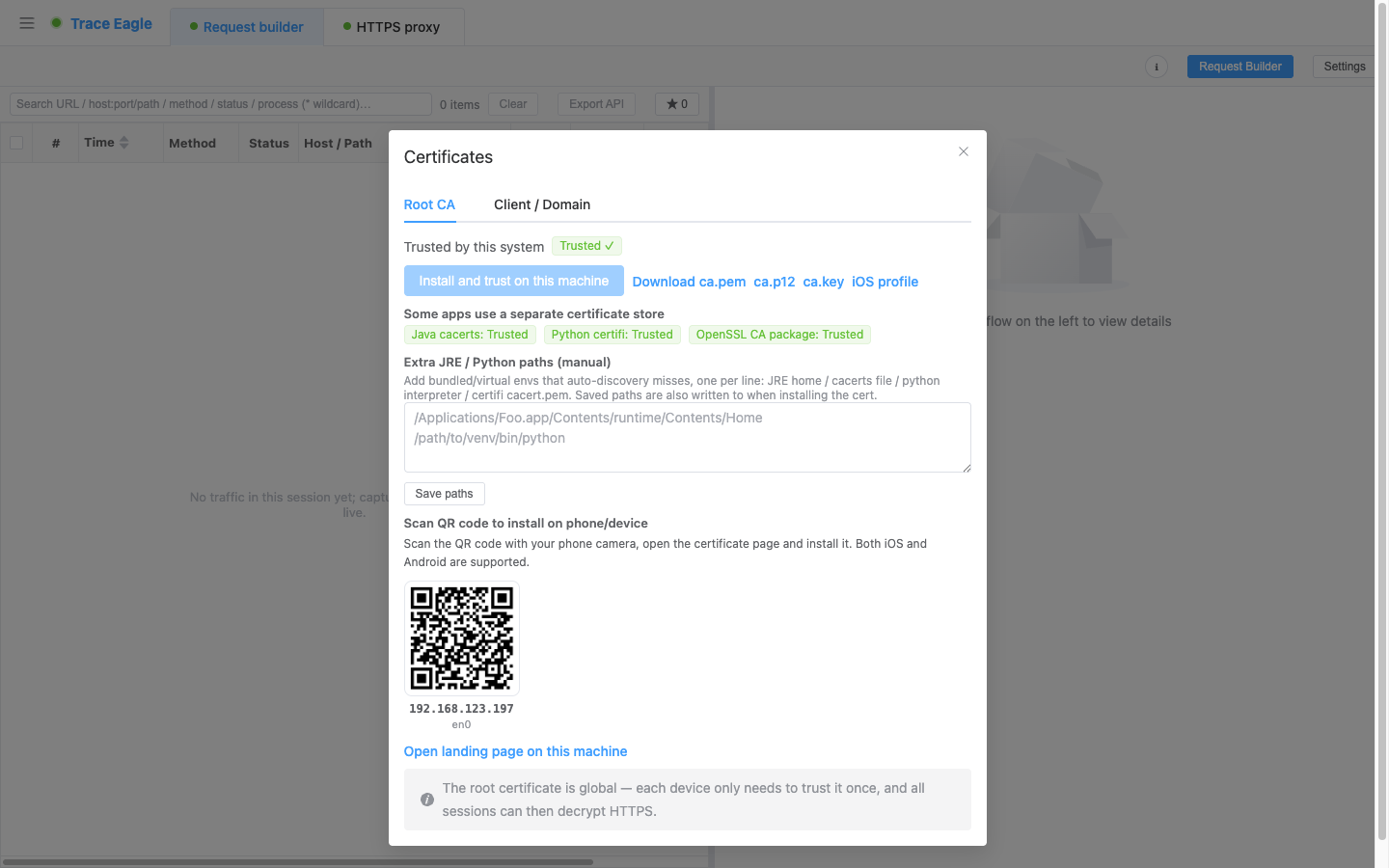
2. Install on a phone by scanning a QR code
Section titled “2. Install on a phone by scanning a QR code”- Generate a QR code for each usable address on the LAN; scan it with the phone camera, open the install page, and set up the certificate, supported on both iOS and Android.
- iOS additionally offers a one-click configuration profile install.
- Rooted Android devices can install the root certificate directly into the system certificate store, sparing you a manual import.
- The root certificate is universally usable, and each device only needs to trust it once.
3. Full certificate coverage: even programs that “don’t trust the system certificate” can be decrypted
Section titled “3. Full certificate coverage: even programs that “don’t trust the system certificate” can be decrypted”Some programs still cannot be decrypted even with the system certificate installed, because they only trust their own certificate list. Full certificate coverage installs the root certificate directly into these programs, so they too can be decrypted:
- Java programs
- Python programs
- Command-line and scripting tools such as curl / wget / Ruby / PHP / git
- Software such as Firefox / Thunderbird
The tool automatically discovers this software on your machine (including what is currently running) and shows “installed / not installed” for each. If auto-discovery misses something, you can also enter the path manually to add it.
This is exactly the perennial headache of ordinary capture tools: the certificate is installed, yet the program still cannot be decrypted. Full certificate coverage is the cure for this.
4. Client certificates
Section titled “4. Client certificates”If the target site requires a client certificate and you happen to have one, import it (with password) on the “Client / Domain certificates” page, and then these sites can be decrypted normally when you capture them.
5. When to use
Section titled “5. When to use”- Before capturing HTTPS with a proxy for the first time, have this machine / phone trust the root certificate.
- Capturing on a phone: scan the QR code to install the certificate.
- When the target is a program such as Java / Python / curl / Firefox and decryption fails: use full certificate coverage to install the certificate into them.
Back to Proxy Capture · Related: Clear Certificate Pinning